Showing posts with label PS VITA GAMES. Show all posts

Tuesday, 26 September 2017

SUPERBEAT: XONiC + (UPDATE+DLC) (NoNpDrm) [USA/EUR] PS VITA DOWNLOAD


Download SUPERBEAT: XONiC Ps Vita


Name: SUPERBEAT: XONiC

Game Region: USA/EUR

Game ID: PCSE00717/PCSB00891

Genre: Action, Rythme, Music

Format: NoNpDrm

Game Size: (EUR: 3.92GB) (USA: 4.74GB)

Server: MEGA

CAPTURE:


DOWNLOAD LINK:


USA GAME+UPDATE 1.02+DLChttp://shink.in/4ysrm


EUR GAME+UPDATE 1.01http://shink.in/kXjpw


HOW TO INSTALL NoNpDrm plugin:


Download the latest nonpdrm.skprx, copy it to ux0:tai and modify the ux0:tai/config.txt file to add the path to the module under *KERNEL as follows.

*KERNEL
ux0:tai/nonpdrm.skprx

Don't forget to reboot your device, otherwise the plugin will have no effect yet.

If you know what you are doing, you may change this path to an arbitrary location as long as it matches the exact location of the module. You may also edit the ur0:tai/config.txt instead assuming you do not have a config.txt file inside the ux0:tai/ folder.

HOW TO INSTALL GAME USA NoNpDrm:


1. Unzip the file.

2. Copy Folder "PCSE00717Which is in Folder "App" to path ux0:/ app/ Using FTP Or USB.

3. Copy Folder "PCS00717" Which is in Folder "Patch" to path ux0:/ Patch/ Using FTP Or USB.

4. Copy Folder "PCSE00717" Which is in Folder "addcont" to path ux0:/ addcont/ Using FTP Or USB.

4. You have to go to Vitashell Home, press the "O" button twice, press the Tringulo button "Refresh livearea" 

5. If everything went well say "Refresh 1 items" And Exit Vitashell And You will find a game Installed On livearea And Done enjoy!.


HOW TO INSTALL GAME EUR NoNpDrm:


1. Unzip the file.

2. Copy Folder "PCSB00891Which is in Folder "App" to path ux0:/ app/ Using FTP Or USB.

3. Copy Folder "PCSB00891" Which is in Folder "Patch" to path ux0:/ Patch/ Using FTP Or USB.

4. You have to go to Vitashell Home, press the "O" button twice, press the Tringulo button "Refresh livearea" 

5. If everything went well say "Refresh 1 items" And Exit Vitashell And You will find a game Installed On livearea And Done enjoy!.


GAMEPLAY:


Don't Starve: Giant Edition (NoNpDrm) [USA] PS VITA DOWNLOAD


Download Don't Starve: Giant Edition Ps Vita


Name: Don't Starve: Giant Edition

Game Region: USA

Game ID: PCSE00450

Genre: Action-adventure, Sandbox

Format: NoNpDrm

Game Size: 214MB

Server: MEGA

CAPTURE:


DOWNLOAD LINK:


http://shink.in/3WQe2


HOW TO INSTALL NoNpDrm plugin:


Download the latest nonpdrm.skprx, copy it to ux0:tai and modify the ux0:tai/config.txt file to add the path to the module under *KERNEL as follows.

*KERNEL
ux0:tai/nonpdrm.skprx

Don't forget to reboot your device, otherwise the plugin will have no effect yet.

If you know what you are doing, you may change this path to an arbitrary location as long as it matches the exact location of the module. You may also edit the ur0:tai/config.txt instead assuming you do not have a config.txt file inside the ux0:tai/ folder.

HOW TO INSTALL GAME NoNpDrm:


1. Unzip the file.

2. Copy Folder "PCSE00085" Which is in Folder "App" to path ux0:/app/ Using FTP Or USB.

3. You have to go to Vitashell Home, press the "O" button twice, press the Tringulo button "Refresh livearea" .

4. If everything went well say "Refresh 1 items" And Exit Vitashell And You will find a game Installed On livearea And Done enjoy!.


GAMEPLAY:


Zero Escape: Virtue's Last Reward (NoNpDrm) [USA] PS VITA DOWNLOAD


Download Zero Escape: Virtue's Last Reward Ps Vita


Name: Zero Escape: Virtue's Last Reward

Game Region: USA

Game ID: PCSE00085

Genre: Adventure, visual novel

Format: NoNpDrm

Game Size: 1.22GB

Server: MEGA

CAPTURE:


DOWNLOAD LINK:


http://shink.in/7XUcC


HOW TO INSTALL NoNpDrm plugin:


Download the latest nonpdrm.skprx, copy it to ux0:tai and modify the ux0:tai/config.txt file to add the path to the module under *KERNEL as follows.

*KERNEL
ux0:tai/nonpdrm.skprx

Don't forget to reboot your device, otherwise the plugin will have no effect yet.

If you know what you are doing, you may change this path to an arbitrary location as long as it matches the exact location of the module. You may also edit the ur0:tai/config.txt instead assuming you do not have a config.txt file inside the ux0:tai/ folder.

HOW TO INSTALL GAME NoNpDrm:


1. Unzip the file.

2. Copy Folder "PCSE00085" Which is in Folder "App" to path ux0:/app/ Using FTP Or USB.

3. You have to go to Vitashell Home, press the "O" button twice, press the Tringulo button "Refresh livearea" .

4. If everything went well say "Refresh 1 items" And Exit Vitashell And You will find a game Installed On livearea And Done enjoy!.


GAMEPLAY:


Monday, 25 September 2017

Super Stardust Delta (NoNpDrm) + (DLC) [USA] PS VITA DOWNLOAD


Download Super Stardust Delta Ps Vita


Name: Super Stardust Delta

Game Region: USA

Game ID: PCSA00006

Genre: Action, Shooter, Shoot'em Up

Format: NoNpDrm

Game Size: 207MB

Server: MEGA

CAPTURE:


DOWNLOAD LINK:


GAME+ALL DLChttp://shink.in/9iOpr


HOW TO INSTALL NoNpDrm plugin:


Download the latest nonpdrm.skprx, copy it to ux0:tai and modify the ux0:tai/config.txt file to add the path to the module under *KERNEL as follows.

*KERNEL
ux0:tai/nonpdrm.skprx

Don't forget to reboot your device, otherwise the plugin will have no effect yet.

If you know what you are doing, you may change this path to an arbitrary location as long as it matches the exact location of the module. You may also edit the ur0:tai/config.txt instead assuming you do not have a config.txt file inside the ux0:tai/ folder.

HOW TO INSTALL GAME NoNpDrm:


1. Unzip the file.

2. Copy Folder "PCSE00053Which is in Folder "App" to path ux0:/ app/ Using FTP Or USB.

4. Copy Folder "PCSE00053" Which is in Folder "addcont" to path ux0:/ addcont/ Using FTP Or USB.

4. You have to go to Vitashell Home, press the "O" button twice, press the Tringulo button "Refresh livearea" 

5. If everything went well say "Refresh 1 items" And Exit Vitashell And You will find a game Installed On livearea And Done enjoy!.


GAMEPLAY:


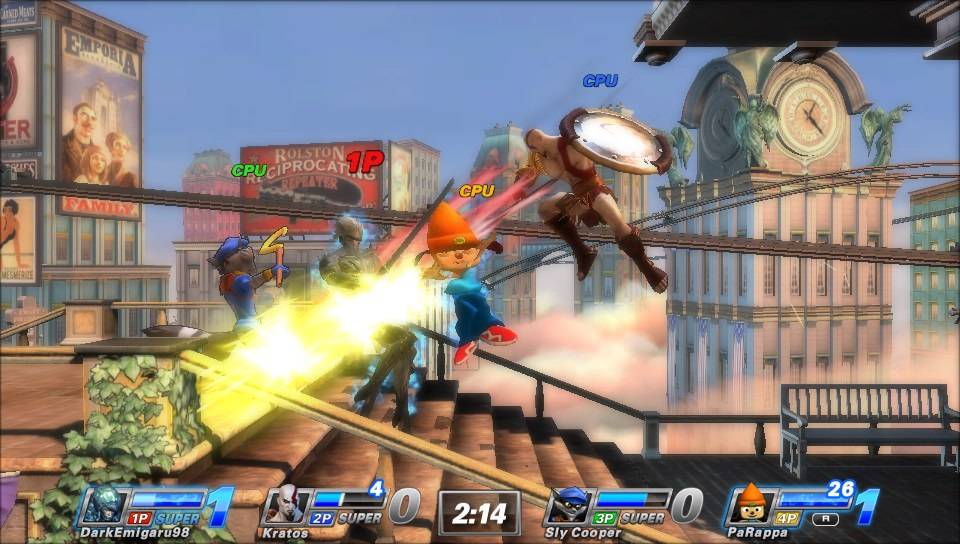
PlayStation All-Stars Battle Royale (NoNpDrm) + (UPDATE+DLC) [USA] PS VITA DOWNLOAD


Download PlayStation All-Stars Battle Royale Ps Vita


Name: PlayStation All-Stars Battle Royale

Game Region: USA

Game ID: PCSA00069

Genre: Action, Fighting, 2D

Format: NoNpDrm

Game Size: 2.03GB

Server: MEGA

CAPTURE:


DOWNLOAD LINK:


GAME+UPDATE 1.12+DLChttp://shink.in/oqMxj


HOW TO INSTALL NoNpDrm plugin:


Download the latest nonpdrm.skprx, copy it to ux0:tai and modify the ux0:tai/config.txt file to add the path to the module under *KERNEL as follows.

*KERNEL
ux0:tai/nonpdrm.skprx

Don't forget to reboot your device, otherwise the plugin will have no effect yet.

If you know what you are doing, you may change this path to an arbitrary location as long as it matches the exact location of the module. You may also edit the ur0:tai/config.txt instead assuming you do not have a config.txt file inside the ux0:tai/ folder.

HOW TO INSTALL GAME NoNpDrm:


1. Unzip the file.

2. Copy Folder "PCSE00053Which is in Folder "App" to path ux0:/ app/ Using FTP Or USB.

3. Copy Folder "PCSE00053" Which is in Folder "Patch" to path ux0:/ Patch/ Using FTP Or USB.

4. Copy Folder "PCSE00053" Which is in Folder "addcont" to path ux0:/ addcont/ Using FTP Or USB.

4. You have to go to Vitashell Home, press the "O" button twice, press the Tringulo button "Refresh livearea" 

5. If everything went well say "Refresh 1 items" And Exit Vitashell And You will find a game Installed On livearea And Done enjoy!.


GAMEPLAY:


Saturday, 23 September 2017

Resident Evil: Revelations 2 (NoNpDrm) [USA] PS VITA DOWNLOAD


Download Resident Evil: Revelations 2 Ps Vita


Name: Resident Evil: Revelations 2

Game Region: USA

Game ID: PCSE00608

Genre: Action-adventure, Survival

Format: NoNpDrm

Game Size: 3.80GB

Server: MEGA

CAPTURE:


DOWNLOAD LINK:


http://shink.in/fLhVQ


HOW TO INSTALL NoNpDrm plugin:


Download the latest nonpdrm.skprx, copy it to ux0:tai and modify the ux0:tai/config.txt file to add the path to the module under *KERNEL as follows.

*KERNEL
ux0:tai/nonpdrm.skprx

Don't forget to reboot your device, otherwise the plugin will have no effect yet.

If you know what you are doing, you may change this path to an arbitrary location as long as it matches the exact location of the module. You may also edit the ur0:tai/config.txt instead assuming you do not have a config.txt file inside the ux0:tai/ folder.

HOW TO INSTALL GAME NoNpDrm:


1. Unzip the file.

2. Copy Folder "PCSE00608" Which is in Folder "App" to path ux0:/app/ Using FTP Or USB.

3. You have to go to Vitashell Home, press the "O" button twice, press the Tringulo button "Refresh livearea" .

4. If everything went well say "Refresh 1 items" And Exit Vitashell And You will find a game Installed On livearea And Done enjoy!.


GAMEPLAY:


Mortal Kombat (NoNpDrm) [USA] PS VITA DOWNLOAD


Download Mortal Kombat Ps Vita


Name: Mortal Kombat

Game Region: USA

Game ID: PCSE00023

Genre: Action, Fighting, 2D

Format: NoNpDrm

Game Size: 3GB

Server: MEGA

CAPTURE:


DOWNLOAD LINK:


http://shink.in/8gKY4


HOW TO INSTALL NoNpDrm plugin:


Download the latest nonpdrm.skprx, copy it to ux0:tai and modify the ux0:tai/config.txt file to add the path to the module under *KERNEL as follows.

*KERNEL
ux0:tai/nonpdrm.skprx

Don't forget to reboot your device, otherwise the plugin will have no effect yet.

If you know what you are doing, you may change this path to an arbitrary location as long as it matches the exact location of the module. You may also edit the ur0:tai/config.txt instead assuming you do not have a config.txt file inside the ux0:tai/ folder.

HOW TO INSTALL GAME NoNpDrm:


1. Unzip the file.

2. Copy Folder "PCSE00023" Which is in Folder "App" to path ux0:/app/ Using FTP Or USB.

3. You have to go to Vitashell Home, press the "O" button twice, press the Tringulo button "Refresh livearea" .

4. If everything went well say "Refresh 1 items" And Exit Vitashell And You will find a game Installed On livearea And Done enjoy!.


GAMEPLAY:


Assassin's Creed III: Liberation (NoNpDrm) + (UPDATE) [USA] PS VITA DOWNLOAD


Download Assassin's Creed III: Liberation Ps Vita


Name: Assassin's Creed III: Liberation

Game Region: USA

Game ID: PCSE00053

Genre: Action-adventure, Open World

Format: NoNpDrm

Game Size: 2.63GB

Server: MEGA

CAPTURE:


DOWNLOAD LINK:


GAME+UPDATE 1.02http://shink.in/YwjI6


HOW TO INSTALL NoNpDrm plugin:


Download the latest nonpdrm.skprx, copy it to ux0:tai and modify the ux0:tai/config.txt file to add the path to the module under *KERNEL as follows.

*KERNEL
ux0:tai/nonpdrm.skprx

Don't forget to reboot your device, otherwise the plugin will have no effect yet.

If you know what you are doing, you may change this path to an arbitrary location as long as it matches the exact location of the module. You may also edit the ur0:tai/config.txt instead assuming you do not have a config.txt file inside the ux0:tai/ folder.

HOW TO INSTALL GAME NoNpDrm:


1. Unzip the file.

2. Copy Folder "PCSE00053Which is in Folder "App" to path ux0:/ app/ Using FTP Or USB.

3. Copy Folder "PCSE00053" Which is in Folder "Patch" to path ux0:/ Patch/ Using FTP Or USB.

4. You have to go to Vitashell Home, press the "O" button twice, press the Tringulo button "Refresh livearea" 

5. If everything went well say "Refresh 1 items" And Exit Vitashell And You will find a game Installed On livearea And Done enjoy!.


GAMEPLAY:


Thursday, 21 September 2017

Wanderjahr (MAI) [USA] PS VITA DOWNLOAD


Download Wanderjahr Ps Vita


Name: Wanderjahr

Game Region: USA

Game ID: PCSE00938

Genre: Role-playing

Format: MaiDump

Game Size: 1.25GB

Server: MEGA

CAPTURE:


DOWNLOAD LINK:


http://shink.in/58zS2


GAMEPLAY:


Spy Chameleon (NoNpDrm) [USA] PS VITA DOWNLOAD


Download Spy Chameleon Ps Vita


Name: Spy Chameleon

Game Region: USA

Game ID: PCSE00933

Genre: Puzzle, Action

Format: NoNpDrm

Game Size: 408MB

Server: MEGA

CAPTURE:


DOWNLOAD LINK:


http://shink.in/htr7g


HOW TO INSTALL NoNpDrm plugin:


Download the latest nonpdrm.skprx, copy it to ux0:tai and modify the ux0:tai/config.txt file to add the path to the module under *KERNEL as follows.

*KERNEL
ux0:tai/nonpdrm.skprx

Don't forget to reboot your device, otherwise the plugin will have no effect yet.

If you know what you are doing, you may change this path to an arbitrary location as long as it matches the exact location of the module. You may also edit the ur0:tai/config.txt instead assuming you do not have a config.txt file inside the ux0:tai/ folder.

HOW TO INSTALL GAME NoNpDrm:


1. Unzip the file.

2. Copy Folder "PCSE00933Which is in Folder "App" to path ux0:/app/ Using FTP Or USB.

3. You have to go to Vitashell Home, press the "O" button twice, press the Tringulo button "Refresh livearea" .

4. If everything went well say "Refresh 1 items" And Exit Vitashell And You will find a game Installed On livearea And Done enjoy!.


GAMEPLAY: